Accountability Updates 5-23-16
We’ve made some updates to our accountability dashboard, and given you new filters for Lead Central.
Lead Assignment Filter
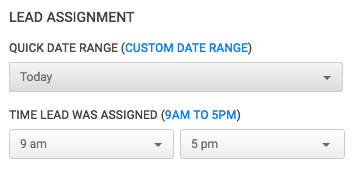
By clicking on “Advanced Filters” you can now access our new Assignment Filter. This tool allows you to easily pull up leads by the day and time they were assigned. This is a great option for agents, and owners to maintain accountability, and keep leads from slipping through the cracks. If you’re a Broker or Admin you can first select which agent you’d like to see leads for then use this filter to pull up their list of leads.
Fixes & Updates
E-alerts reporting now reflects a “no e-alerts” as a lead with no e-alert assigned by any user ever. This was previously reported only if/if not assigned by the agent the lead was assigned to.
We’ve also made some fixes to make sure that all reporting in Lead Central matches the metrics reported in the accountability dashboard.
Thanks to your feedback these improvements make our accountability tools more accurate!
#ProTips!
It’s extremely easy for busy agents to lose track of leads they are unable to qualify right away as new ones come in. This leads to incorrect categorizations, and leads not getting enough follow up attempts. Use the lead assignment filter to pull up leads assigned in the last 7 days, and spend some time with your agents to review the numbers of attempts, categories used, and overall progress of those leads. This is a great way to help new agents on BoomTown stay on track.