4-24-17 Transactions and Dotloop Sync
We’ve just made two very exciting releases that are phase I in what will be a continued effort to make tracking your deals, and gaining market intelligence easier than ever with BoomTown.
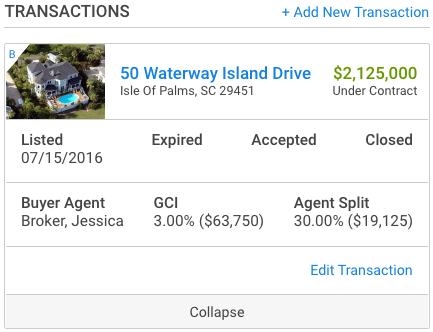
Transactions
You can now create a transaction in any lead profile. Transactions will always stay with a lead even when it is transferred to a different agent. This keeps a long-term record of any deals that happened with that lead, and enable your team to track things from before, during, and after the deal is complete.
Two types are offered Buyer or Seller. Each deal offers it’s own selection of phases for that transaction.
Buyer
- Pre-Contract
- Under-Contract
- Closed
- Abandoned
Seller
- Pre-Listing
- Active-Listing
- Under Contract
- Closed
- Abandoned
These different phases can be used to not only track a deal after it closed, but to also track a potential deal for your sales pipeline. An example..
“I’m thinking about listing in 6-months to a year” – seller of 5090 pittman street.
The agent in this scenario could create a transaction for “pre-listing” and input 5090 pittman street. This transaction, and info will now stay with the lead profile and it’s searchable in lead central!
Sync to Dotloop
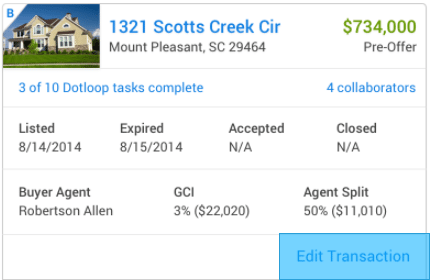
Once a transaction is entered you can now sync this transaction to Dotloop! This creates a seamless handoff from agent to transaction coordinator. Our integration will enable you and your agents to see tasks completed, and collaborators on the loop from the BoomTown lead profile. We generate quick links to see/edit this info in Dotloop.
How To:
- First enable the integration by visiting https://leads.boomtownroi.com/crm.aspx#/dotloop. You can find this link by clicking your profile in lead central > dotloop integration. You’ll be asked to enable the integration and login to your dotloop account. Don’t have dotloop? Visit dotloop.com to learn more about their system, and packages.
- Create a transaction on a lead profile, and ensure the “Sync to dotloop” check box is checked.
- Review data in dotloop. Once the transaction is created in BT the transaction will be created in dotloop.
Important notes
- You must create the transaction in BT first.
- If a transaction already exists creating another in BT will produce a duplicate in dotloop.
- Existing transactions will not be synced when the integration is enabled.
- For detailed instructions visit our Knowledge Base Article on the integration.