My Listing My Lead 3-20-17
We’ve added a new toggle to the Lead Matching rules engine!
Show Listing Agent Photo
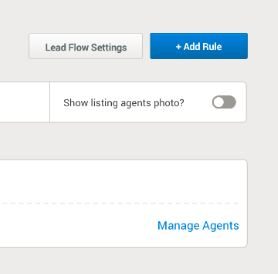
When this toggle is switched on your BoomTown site will now show the listing agent photo next to any of their active listings. Any and all leads captured on these listings will automatically be routed to the displayed agent. This is great if your office or team wishes to utilize a “My Listing My Lead” policy and enable listing agents to keep any leads generated from their listing.
#Protips
- Make sure that your agents who wish to leverage this function have their MLS ID’s entered in their BT profile! If they do not have the ID entered or it is just the brokerage ID their photo will not display.
- This feature does NOT override on agent sub-domains. Any traffic viewing an agent sub-domain will still only see that specific agent.
- This feature does NOT override existing leads already assigned. Leads will only see the agent they’re already assigned to on any listing.
- This rule will take a top priority! If you enable the listing agent on a listing will get priority over any other existing lead matching rules such as price or location.