Networked Users 6-27-16
Do you have multiple BoomTown sites networked together? Do you need to be able to log in and out of user accounts quickly? Then our new Network Users feature is going to make your life easier!
How It Works:
A Network Admin may need to frequently log in to 3 BoomTown accounts.
- Charleston.BoomTown.com
- Columbia.BoomTown.com
- Greenville.BoomTown.com
Previously this would require multiple windows or the need to log out and log in of the different user accounts for these sites such as…
Now with Networked Users you can link these three accounts together, and use one handy modal to jump in and out of the accounts. When you jump to an account you will have all the permissions, and functionality of that user. You can also stay in touch on notifications for those accounts in the modal.
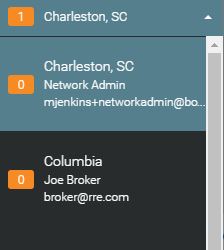
Setup
Linking accounts is very easy to do. Just follow these quick steps. Remember linking accounts must be done by a Network Admin. Network Admin is the only user role who can perform the account links.
Open the “Users Agents” menu in the CRM.
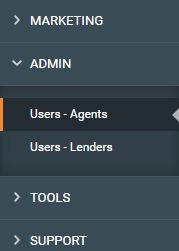
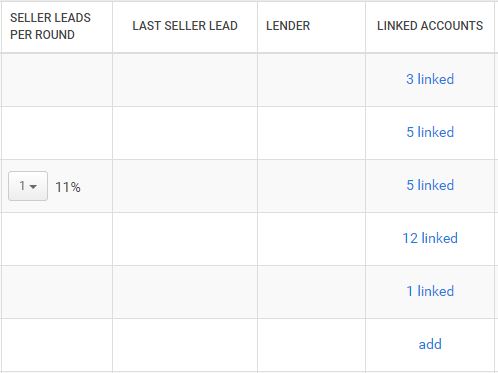
Select a user you would like to link accounts for. Click the “Add” link in the Linked Users column.
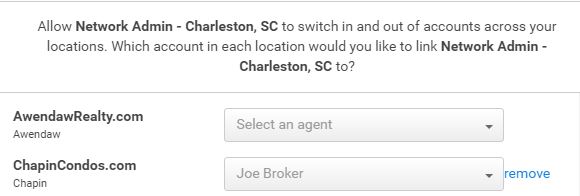
A menu will appear that will bring up all of your sites, and give a user drop down for that site. Simply select the profile from the drop down you would like to Link. Look at the top of the menu to ensure you are on the correct profile you wish to connect. This example has “Network Admin” as the user profile being connected to “Joe Broker” in ChapinCondos.com.
Now the network Admin can use the Modal to jump in and out of the Joe Broker profile. If Joe broker gets a message the orange notification icon will have a number for the number of messages.
Don’t Have Networked Sites?
The Networked Users functionality makes operating in multiple markets, and expanding your business simple. This allows you to have separate teams of agents, and tie them together with roll up reporting, and connected support such as ISA teams. If you’re looking to expand or want help getting your existing platforms running smoothly let our Success Team help you create a game plan.
Call or Email our Client Concierge team we’re here to help!
Phone: (843) 300-3318
Email: [email protected]